 Marketinist
What Mark does
Your social media
You hand over the account and the job, not a queue to fill in. Mark plans the week, writes it, draws it, and brings you the whole batch to say yes to.
Planning
Writes your posts
Plans the week, writes the copy, and brings you the batch to approve in one word.


It starts without being asked
You pick a day and an hour — once a week, or once a day. At that time Mark sits down and writes the next batch: what to say, where it goes, and when. You get one message with the lot, and the week is planned before you have thought about it.
That appointment is when Mark writes, never when anything publishes. The two get confused often enough to be worth saying plainly: nothing leaves on a timer. The posts inside a batch are spread across the days, because a week’s worth arriving at once reads as a machine, and every one of them is a real entry you can move or cancel.
Approving is one word
Reply yes and the batch is scheduled. Or take them one at a time: change a sentence, ask for a different picture, drop one you do not want. Anything you would rather do on a screen — reading the week laid out, editing a draft properly, deleting several — is on your calendar in the web app, and it is the same drafts either way.
Nothing publishes without that approval. It is not a preference you could turn off by accident: the approval is recorded on the server, and the part of the system that schedules a post refuses anything that has not got one. Mark cannot write itself the permission.
Each account gets what suits it
A post is not one piece of text sprayed everywhere. Every network has its own rules about length, links and pictures, and Mark writes to them rather than truncating at the end — the version that lands on each account is one written for that account.
Pictures
Makes the pictures
Send your own photo and Mark uses it, or builds on it. Send nothing and it makes one. Either way the picture belongs to the post, not to a stock library.
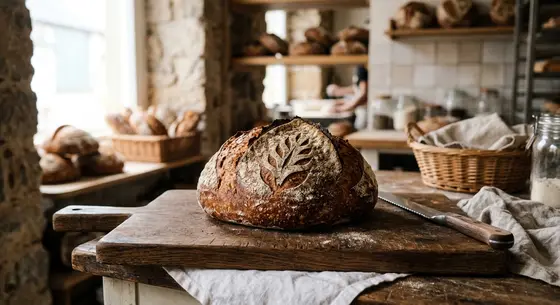 Made you one.
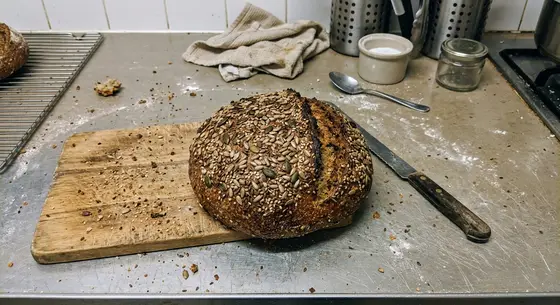 Actually, use this one but add a coffee cup on the side.
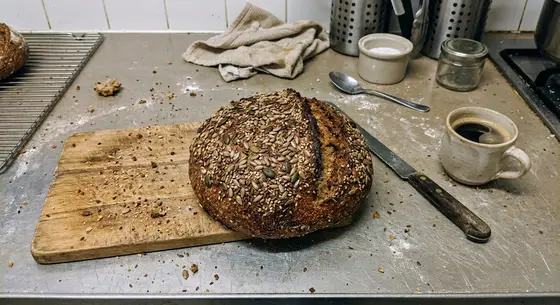 Like this?
Three ways a picture happens
Send nothing and Mark makes one for that post. Send a photograph and it uses yours, untouched, because a real photograph of your own shop beats anything generated. Send a photograph with a note — use this but add a coffee cup on the side — and it works on the one you sent.
No stock library, ever. A stock photograph of a bakery is a photograph of somebody else’s bakery, and your customers can tell. The picture is made for the post it belongs to or it is one you took.
It asks before it spends
Pictures cost money to make, so when Mark is working unattended it does what you told it to: make one, or ask first. It never quietly generates a row of options for you to browse — that is spending on work nobody asked for, and the answer to "which of these six" is usually "none".
Voice
Sounds like your business
Learns your voice from the posts you already wrote, and from every change you make to a draft, so it reads like you, not like an AI.
Learned from what you already wrote
With your permission, Mark reads the posts you have published before and works out how you write — sentence length, what you never say, whether you use exclamation marks. It fills in a short profile, and you get to read and change it before it is used. If you would rather not hand over the old posts, skip it and just tell Mark instead.
Nothing it guesses goes into that profile silently. The profile is yours: you can edit it, and you can withdraw it.
And from every correction
When you rewrite a draft before approving it, the difference between what Mark wrote and what you sent is the most useful thing it will see all week. It keeps it, and the next batch is closer.
Questions about this
Will it post something without asking me?
No. Nothing publishes without your approval, and that is a rule in the code rather than a setting you have to find: an approval is recorded server-side, and the part of the system that schedules a post refuses anything that has not got one. Mark cannot grant it to itself.
What Mark does on its own is the work — planning, writing, drawing — so that what arrives is a finished thing to say yes or no to.
Where can it publish?
Your social accounts, and your own site. The wall on the front page is the current list, drawn from what actually works rather than from a brochure — the greyed ones are not finished and are labelled as such. For the blog it publishes to WordPress or Wix, or to any other site through a signed webhook your developer can implement from the contract page.
Can I use my own photographs?
Yes, and it is the better path. Send a photo and Mark writes the post around it; send one with a note and it will work on it — crop it, clean it, add something. Send nothing and it makes a picture for that post. What it never does is reach into a stock library, because a stock photograph of a bakery is not a photograph of your bakery.
How does it end up sounding like us and not like a robot?
It reads the posts you have already written — with your permission, and you can decline and simply tell it instead — and keeps what it learns as a short profile you can see and edit. After that, every change you make to a draft is a correction it keeps. The profile is yours: you can read it, change it, or withdraw it.
Hand over the posting.
Tell Mark about your business once. It brings you next week’s work, and waits for one word.
 Sign in with Telegram
No password, nothing to remember.